![ExpensePoint White Logo.png]](https://support.expensepoint.com/hs-fs/hubfs/ExpensePoint%20Logos/ExpensePoint%20White%20Logo.png?height=40&name=ExpensePoint%20White%20Logo.png)
Steps to Manage Contact Options
- Access the License Administrator
Click on the License Administrator module at the top of the ExpensePoint window.
- Select Contact Options
From the left side navigation menu, select the Contact Options section.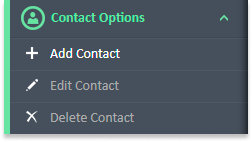
- Available Actions
From here, you can:- Add a Contact
- Edit a Contact
- Delete a Contact
- Understanding Contacts
- Users listed under the Contacts section have the authority to contact the ExpensePoint support team and make changes to your account.
- The Billing Contact is the designated user who receives all communications and ExpensePoint invoices via email.
Watch the video below for a step-by-step guide to managing contacts.