![ExpensePoint White Logo.png]](https://support.expensepoint.com/hs-fs/hubfs/ExpensePoint%20Logos/ExpensePoint%20White%20Logo.png?height=40&name=ExpensePoint%20White%20Logo.png)
Payment types encompass the various methods used to settle expenses within an organization. They define how financial transactions are processed.
Common payment types include:
- Paid with Cash Advance
- Paid by Employee (out of pocket)
- Paid by the Company (typically via corporate credit card)
- Reimburse Company
- Reimburse Employee
- Reduce Cash Advance
- No Settlement Required
Steps to Manage Payment Types in ExpensePoint
- Open Settings Manager
From the top of your screen, click the Settings Manager module.
- Access Payment Type
Select Payment Type from the left-side navigation menu.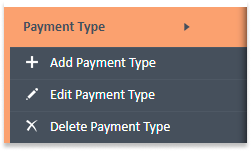
- Payment Type Workspace
The Payment Type workspace will open, displaying the list of Payment Types.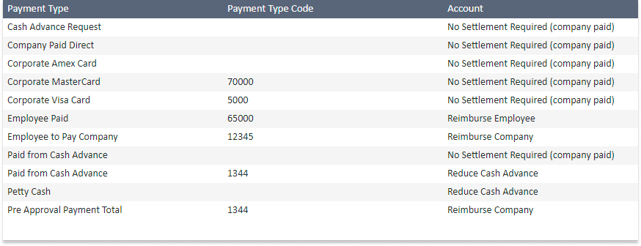
- The list includes key details such as:
- Payment Type
- Payment Type Code
- Account
- From the Payment Type navigation menu on the left, you can:
- Add a Payment Type
- Edit a Payment Type
- Delete a Payment Type
- The list includes key details such as:
Watch the video below for a visual guide on Payment Types.